因为书中的代码比较久远,许多接口、webpack配置都已更新,但这个项目还是很好玩的,本文的代码都是相对于原书代码的补充。
完整代码:https://github.com/RichDavidMu/zhihuDaily
webpack配置
虽然最新的webpack已经是4.0版本。但与书中的webpack2大多能兼容,只有几个地方稍有变化
vue-loader
vue-loader@15.x 版本相较之前需要增加一些配置
1
2
3
4
5
|
const VueLoaderPlugin = require('vue-loader/lib/plugin');
{...}
plugins:[new VueLoaderPlugin()]
{...}
|
webpack4中建议使用mini-css-extract-plugin,而不是extract-text-webpack-plugin。
1
2
3
4
5
6
7
8
9
10
11
12
13
14
15
16
17
|
const MiniCssExtractPlugin = require("mini-css-extract-plugin");
{...}
{
test:/\.css$/,
use:[
{
loader: MiniCssExtractPlugin.loader
},
'css-loader'
]
}
{...}
new MiniCssExtractPlugin({
filename: "[name].css",
chunkFilename: "[id].css"
})
|
遇到的一个坑
因为这是一个单页应用,所以在写css的时候,我把他们全部写在app.vue文件中,这样在打包的时候,会自动的在打包后样式中加上属性选择器,就像这样
1
2
3
| .daily-item[data-v-186c01a3]:hover{
background: #e3e8ee;
}
|
然后坑来了,因为用的html-webpack-plugin自动生成html文件,而他的模板文件中的body、html元素不会自动生成相应的属性,打开控制台看一下Element
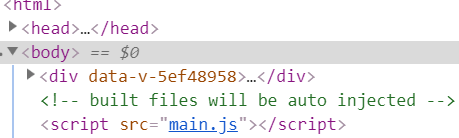
可以看到body,html元素均没有属性选择器,而写在vue文件的元素有,这样,我们在app.vue中的有关<html><body>的样式均无法生效。
解决:新建一个style.css文件,在main.js中引用,将body、html的样式写在里面,这样打包后的样式不会被加上属性选择器。
热门栏目功能
因为书中的主题日报所用的api已经无效,看了一下这篇文章 日报 API 分析,使用postman把里面的接口都试了一下,发现栏目的api可用,虽然是内容已经停止更新了,但作为练习的话,影响不大。
首先建立一个section的代理服务器,用来转发数据,解决跨域限制
1
2
3
4
5
6
7
8
9
10
11
12
13
14
15
16
17
18
19
20
21
22
23
24
25
26
|
const http = require('http');
const request = require('request');
const hostname = '127.0.0.1';
const sectionPort= 8012;
const sectionServer = http.createServer((req, res) => {
const url = 'http://news-at.zhihu.com/api/3' + req.url;
const options = {
url: url
};
function callback (error, response, body) {
if (!error && response.statusCode === 200) {
res.setHeader('Content-Type', 'text/plain;charset=UTF-8');
res.setHeader('Access-Control-Allow-Origin', '*');
res.end(body);
}
}
request.get(options, callback);
});
sectionServer.listen(sectionPort, hostname, () => {
console.log(`栏目代理运行在 http://${hostname}:${sectionPort}/`)
});
|
增加相应的ajax模块
1
2
3
4
5
6
7
8
9
10
11
12
13
14
15
|
import axios from 'axios';
const Util = {
sectionPath:'http://127.0.0.1:8012/'
};
Util.ajaxSection = axios.create({
baseURL: Util.sectionPath
});
Util.ajaxStories.interceptors.response.use(res => {
return res.data;
});
export default Util;
|
写上栏目的html结构,在data中加入我们需要维护的数据
1
2
3
4
5
6
7
8
9
10
11
12
13
14
15
16
17
18
19
20
21
22
23
24
25
26
27
28
29
30
31
32
33
34
35
36
37
38
39
40
41
42
43
44
|
<template>
<div>
<div class="daily">
<div class="daily-menu">
...
<div class="daily-menu-item"
:class="{on:type==='section'}"
@click="showSection = !showSection">热门栏目</div>
<ul v-show="showSection">
<li v-for="item in sections">
<a :class="{on: item.id === sectionId && type === 'section'}"
@click="handleToSection(item.id)">{{ item.name}}</a>
</li>
</ul>
</div>
</div>
<div class="daily-list" ref="list">
...
<template v-if="type === 'section'">
<item v-for="item in list"
:data="item"
:key="item.id"
@click.native="handleClick(item.id)"></item>
</template>
</div>
<daily-article :id="articleId" :type="this.type"></daily-article>
</div>
</div>
</template>
<script>
export default {
data(){
return {
sections:[],
showSection:false,
type:'recommend',
sectionId:0,
list:[],
sectionTime:0,
}
}
}
</script>
|
定义一个method,当点击栏目时,访问栏目api,获得栏目列表,并将数据写入data中
1
2
3
4
5
6
7
| methods:{
getSections(){
$.ajaxSection.get('sections').then(res =>{
this.sections = res.data;
})
}
}
|
当点击具体某个栏目时,中间栏要显示该栏目的文章列表,定义一个method,当调用这哥method时,访问api,将数据写入data,DOM的改变让Vue去做
1
2
3
4
5
6
7
8
9
| handleToSection(id){
this.type = 'section';
this.sectionId = id;
this.list = [];
$.ajaxSection.get('section/'+id).then(res=>{
this.sectionTime = res.timestamp;
this.list = res.stories;
})
}
|
为中间栏添加scroll事件
1
2
3
4
5
6
7
8
9
10
11
12
13
14
| mounted() {
const $list = this.$refs.list;
$list.addEventListener('scroll',()=>{
if(this.isloading) return;
if($list.scrollTop + document.body.clientHeight >= $list.scrollHeight-100){
if(this.type === 'recommend') {
this.dailyTime -=86400000;
this.getRecommendList();
}else{
this.getSectionList()
}
}
});
}
|
下拉中间栏到底,自动加载更多数据
1
2
3
4
5
6
7
8
9
10
| getSectionList(){
this.isloading = true;
$.ajaxSection.get('section/' +this.sectionId+`/before/${this.sectionTime}`).then(res=>{
this.sectionTime= res.timestamp;
for (const value of res.stories){
this.list.push(value);
}
this.isloading=false;
})
}
|
栏目文章详情组件
一开始只是把日报的组件拿来用,发现直接用v-html转换的页面太难看。

正好栏目api提供了对应文章的知乎页面的url
1
2
3
4
5
6
7
8
9
10
11
12
13
14
| {
"timestamp": 1463148001,
"stories": [
{
"image_hue": "0x3779b3",
"title": "深夜惊奇 · 要穿内衣",
"url": "https://daily.zhihu.com/story/8387524",
"date": "20160601",
"display_date": "6 月 1 日",
"images": [
"http://pic3.zhimg.com/91125c9aebcab1c84f58ce4f8779551e.jpg"
],
"id": 8387524
},
|
可以看到上面的stories中url就是文章对应知乎页面了,可以用一个<iframe>直接显示这个页面。但是为了尽量少动代码,还是将知乎的html源码保存下来,用v-html直接显示
增加一个stories代理服务器,与之前类似
1
2
3
4
5
6
7
8
9
10
11
12
13
14
15
16
|
const storiesServer = http.createServer((req, res) => {
const url = 'https://daily.zhihu.com/story' + req.url;
const options = {
url: url
};
function callback (error, response, body) {
}
}
request.get(options, callback);
});
storiesServer.listen(storiesPort, hostname, () => {
console.log(`栏目故事代理运行在 http://${hostname}:${storiesPort}/`)
});
|
相应的ajax模块
1
2
3
4
5
6
7
8
9
10
11
12
13
|
import axios from 'axios';
const Util = {
storiesPath:'http://127.0.0.1:8013/'
};
Util.ajaxStories = axios.create({
baseURL:Util.storiesPath
})
Util.ajaxStories.interceptors.response.use(res => {
return res.data;
});
|
daily-article组件
props中增加一个参数type,接受父组件的信息,现在显示哪一部分,使用watch监控id与type,当他们发生改变时,调用相应方法
1
2
3
4
5
6
7
8
9
10
11
12
13
14
15
16
17
18
19
20
21
22
23
24
25
26
27
28
29
30
31
32
33
34
35
36
37
38
|
<template>
<div class="daily-article">
<div v-if="this.type === 'recommend'" class="daily-article-title">{{ data.title }}</div>
<div v-if="this.type === 'recommend'" class="daily-article-content" v-html="data.body"></div>
<div v-if="this.type === 'section'" v-html="this.htmlData"></div>
<div class="daily-comments" v-show="comments.length">
</div>
</div>
</template>
<script>
{...}
props:{
type:{
type:String,
default:'recommend'
}
},
data(){
return{
htmlData:''
}
},
watch:{
type(val){
this.data={},
this.comments=[],
this.htmlData=''
},
id(val){
if (this.type==='recommend'&&val) {
this.getArticle();
}else {
this.getStores()
}
}
}
|
1
2
3
4
5
6
7
8
| getStores(){
$.ajaxStories.get(`${this.id}`).then(res=>{
res =res.replace(/src="http/g,'src="' + $.imgPath+'http');
res =res.replace(/src="https/g,'src="' + $.imgPath + 'https');
this.htmlData = res;
this.getComments();
})
}
|
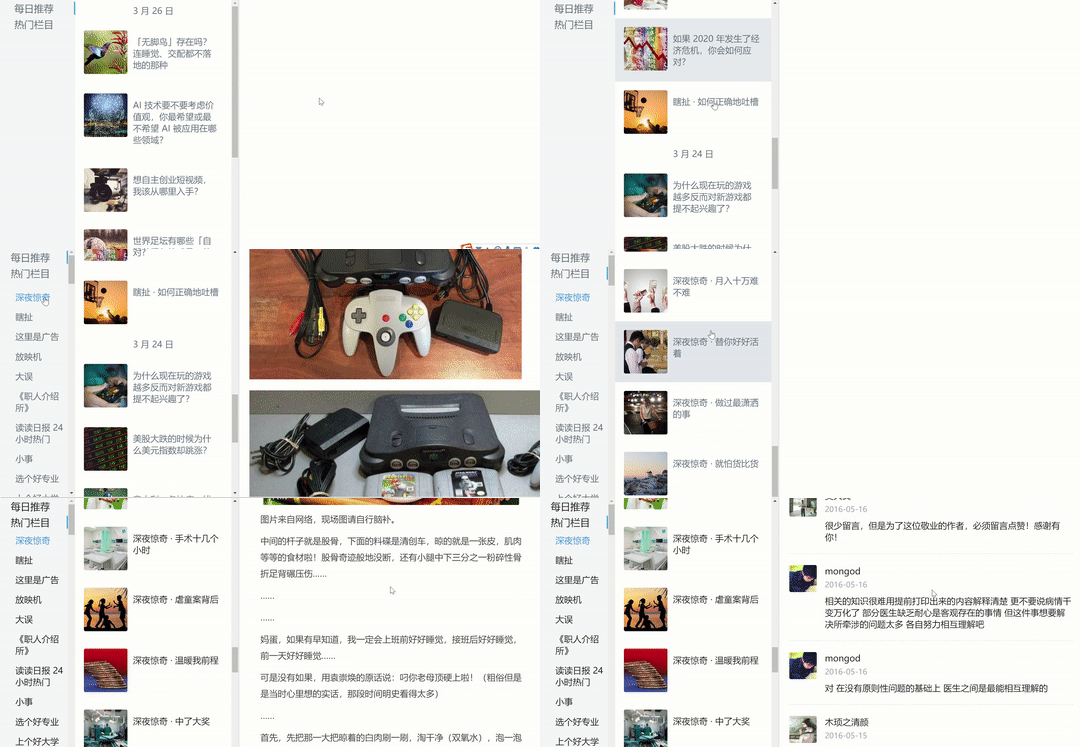
本以为大功告成了,打开网页发现并没有显示文章,上来就是评论

打开控制台看到

看起来好像是css文件被跨域限制了,无法引用。那就用之前图片的代理服务器转发一下就好了。
1
2
3
4
5
6
7
8
|
methods:{
getStores(){
$.ajaxStories.get(`${this.id}`).then(res=>{
res =res.replace(/href="http/g,'href="' + $.imgPath+'http');
res =res.replace(/href="https/g,'href="' + $.imgPath + 'https');
})
}
|
再打开网页,确实没问题了,但是这个知乎app的提醒很烦,把它去掉。

在html里找他的类名,在后面加上display:none
1
2
3
4
5
6
7
|
methods:{
getStores(){
$.ajaxStories.get(`${this.id}`).then(res=>{
res =res.replace(/ZhihuDailyOIABanner"/,'ZhihuDailyOIABanner" style="display:none;"')
})
}
|
完工